

About us
More about our company
Services
We build brands

Contact
Visit our office


$804.00
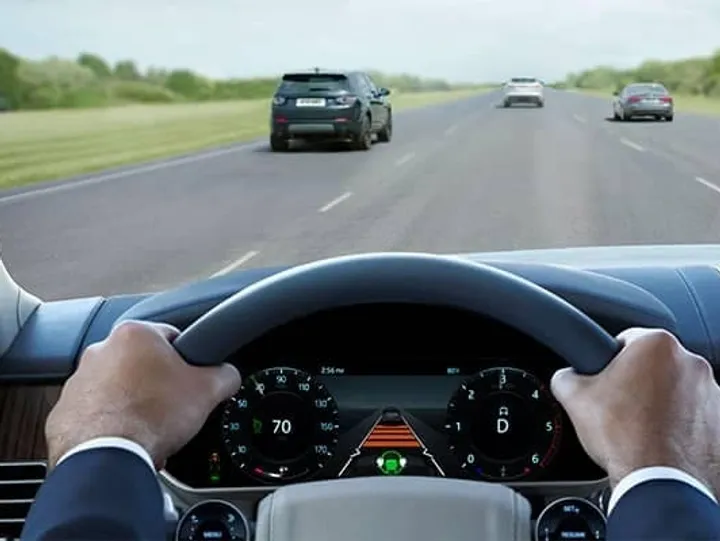
Dash Cam is presented by JLR Retrofit as a vehicle electronics upgrade with its published choices, references and selection checks organised into a practical buying resource. For this reason, buyers can separate confirmed information from checks that still require vehicle or order details.
The listed item is Genuine Dash Cam, with this configuration recorded in the source data: Car Model: Default Title. First compare the product reference and option label. Then use the gallery as a visual reference rather than treating appearance alone as proof of compatibility.
Electronic upgrades can depend on software level, factory equipment and vehicle configuration. A matching model name alone is not enough. Record the VIN and current system details before comparing the listed option with your vehicle.
Compatibility for dash cam should be assessed from the vehicle or application, production details, factory equipment and chosen option, using the published references as a checklist. This gives buyers a clear basis for the next decision without presenting unverified details as facts.
| Selection point | Published information |
|---|---|
| Listed item | Genuine Dash Cam |
| Reference or SKU | No SKU is published |
| Vehicle or year information | No explicit model-year list is published |
| Construction or material references | See the product title and selected option |
| Dimensions in source data | No standalone dimension is published |
| Ratings in source data | No additional numeric rating is published |
| Variant weight | Not published |
| Available configuration | Car Model: Default Title |
Begin with the VIN or application record and compare it with the table. Next, review qualifiers such as side, finish, equipment level and quantity. However, an empty source field remains an open question; it should not be converted into an assumed specification.
To order dash cam, start with the exact product reference and required configuration, then resolve compatibility or package questions before payment so similar listings remain clearly distinguished. As a result, the listing can be used as a practical reference before an order or workshop visit is arranged.
You can also compare svr lightweight titanium exhaust to understand the differences between adjacent listings. This comparison does not imply that two products share identical fitment or package contents.
For vehicle-family guidance, visit the JLR Retrofit vehicle coverage hub. The relevant service pathway is also explained in our coding and retrofit service guide.
Preparation for dash cam depends on the supplied item and its application, so buyers should review package contents, installation needs and post-installation checks before normal use. This approach keeps the selection process transparent and directs unresolved questions to the support team.
For electrical or software work, a technician should assess the existing modules and required procedure. Any coding, programming or calibration should be followed by a function check.
In addition, retain instructions and order notes supplied with the product. Keep removed components available until the replacement has been checked, and compare connectors, orientation and mounting points before final assembly where relevant.
You can consult the official Land Rover website for manufacturer terminology. The JLR Retrofit team maintains this selection resource. Last updated: 9 November 2026.
These questions address common buyer concerns about dash cam, including vehicle suitability, listed choices, package contents and installation, while separating published facts from details needing confirmation. For this reason, buyers can separate confirmed information from checks that still require vehicle or order details.
How do I check whether dash cam suits my vehicle?
Suitability for dash cam depends on the VIN, production details, factory equipment and selected option. Compare the published references first, then request a compatibility review if any detail remains unclear.
Which configuration is listed for genuine dash cam?
The source data lists Car Model: Default Title. Read the complete option label before ordering because another configuration can change the supplied item, appearance or installation requirements.
What does the listed price or package include?
The product title and selected option identify the listed item. They do not prove that unlisted fixings, accessories or services are included. Request confirmation when package contents affect your decision.
Can this product require workshop support?
Requirements depend on the product and application. For electrical or software work, a technician should assess the existing modules and required procedure. A final function or fitment check is recommended where installation work is performed.
Which details should I keep for after-sales support?
Keep the order reference, selected configuration and product link for dash cam. Vehicle details and clear photos can also help the support team resolve a compatibility or installation question efficiently.
| Car Model | Defender 2020+ |
|---|
Only logged in customers who have purchased this product may leave a review.


Uncategorized

Uncategorized

Uncategorized

Uncategorized

Uncategorized


Reviews
There are no reviews yet.